SunSpec Modbus Server
The DER Simulator hosts a SunSpec-compliant Modbus TCP server that exposes every SunSpec model the loaded device configuration populates. Anything you can do with a real DER's Modbus interface — read the nameplate, scan the model list, write a grid-support setpoint, drive curves — works against the simulator unchanged.
Quick start
The Modbus server is on by default; the only required flag is the TCP port if you want something other than 8502:
./sim --device_type PV-3Phase --mb_port 8502
For multi-device runs (-N COUNT) each device gets its own port
starting from --mb_port and incrementing by 1. With -N 4
--mb_port 8502 the four simulators bind 8502 / 8503 / 8504 / 8505.
CLI flag reference
| Flag | Default | Notes |
|---|---|---|
-mb / --mb_enable |
yes |
Set to no to skip Modbus and run Modbus-less (e.g. CSIP-only) |
--mb_host |
0.0.0.0 |
Bind address. Set to 127.0.0.1 for loopback-only |
-p / --mb_port |
8502 |
TCP port. Increments by 1 per additional device on -N > 1 |
-e / --mb_enc |
no |
TLS encryption (Secure SunSpec). See Secure SunSpec below |
-mbc / --mb_cert |
(empty) | Server certificate PEM for TLS — required when --mb_enc yes |
-mbk / --mb_key |
(empty) | Server private key PEM for TLS |
-mbr / --mb_root_cert |
(empty) | CA chain PEM for client-cert mTLS (Secure SunSpec is mTLS-mandatory) |
-mbx / --mb_ciphers |
SunSpecTCP-17 list | OpenSSL cipher list for TLS 1.2 — defaults to the Secure SunSpec mandatory suites |
-mbv / --mb_tls_version |
1.2 |
One of 1.2, 1.3, 1.2+1.3 |
What you can do over Modbus
The simulator implements every SunSpec model its device config loads. The dashboard's nameplate and grid-support pages talk to the same address map an external Modbus client would, so anything the dashboard shows you can read directly from a SunSpec scanner.
Concretely:
| Read | Models |
|---|---|
| Identity + live AC measurements | 1 (common), 701 (nameplate plus W, Var, VA, V, A, Hz, PF, energy registers) |
| Ratings + settings | 702 (operator-configurable WMax, VAMax, VAR limits) |
| DC-side per-port detail | 714 (port type, voltage, current, energy), 715 (per-port DC voltage / current / energy) |
| Battery hierarchy | 802 (bank), 803 (string), 804 (module) — battery and hybrid-DC scenarios only |
| Grid-support modes | 704 (Fixed PF), 705 (Volt-Var), 706 (Volt-Watt), 711 (Frequency-Droop), 712 (Watt-Var) |
| Simulation knobs | 30004 (irradiance, grid voltage / frequency overrides) |
The 30004 model is dersim-specific — it's how an external test harness drives the simulator's environment (irradiance, grid voltage, grid frequency) at runtime without restarting. Production DERs don't have a 30004 equivalent; the dashboard's Simulation Inputs page writes the same fields.
| Write | What happens |
|---|---|
| 704 PF setpoint, 705 / 706 / 711 / 712 curve points | Live grid-support modes take effect on the next inverter tick |
| 702 settings | WMax, VAMax, VAR limits — clamps the inverter's available output |
| 802 / 713 SoC | Force the battery's state-of-charge to a specific value |
| 30004 environment | Pin irradiance / V / Hz for deterministic scenarios |
Secure SunSpec Modbus (TLS + mTLS)
The Secure SunSpec Modbus specification requires TLS 1.2 with
mutual client authentication and a specific cipher set. The
simulator implements the full spec when --mb_enc yes is set:
./sim --device_type PV-3Phase \
      --mb_enc yes \
      --mb_cert  /opt/dersim/certs/modbus/server.pem \
      --mb_key   /opt/dersim/certs/modbus/server.key \
      --mb_root_cert /opt/dersim/certs/modbus/ca.pem
Five things to know about the TLS path that the plaintext path doesn't surface:
- mTLS is mandatory. The server demands a client certificate
and verifies it against
--mb_root_cert. Plain TLS with no client cert is not Secure SunSpec — the spec defines mTLS as the only conformant mode. - Cipher list is the spec's mandatory suites by default. The
default
--mb_ciphersincludes the SunSpecTCP-17 set (ECDHE-ECDSA-AES128-GCM-SHA256, ECDHE-ECDSA-CHACHA20-POLY1305, ECDHE-ECDSA-AES128-CCM8). The list ends with@SECLEVEL=0because OpenSSL 3.x otherwise rejects AES128-CCM8 (64-bit tag). Keep@SECLEVEL=0in any custom list that needs to offer AES128-CCM8. - TLS 1.3 is opt-in. Default
--mb_tls_versionis1.2matching the spec; pass1.2+1.3to negotiate either, or1.3to require it. - The test PKI is bundled. For lab work where you don't have
a real Secure SunSpec PKI, leave the cert flags empty and the
simulator loads the bundled
cert_592058646942_*test certs. These are well-known LFDIs that match the SunSpec reference client harness. - The same test PKI works against the LabTest GUI. The GUI's "Encrypt Modbus" toggle ships with the same bundled certs; leave both ends on default and they connect cleanly.
Modbus RTU (serial)
For lab benches that need to drive the simulator over a real serial line — e.g. through a vendor's SunSpec-compliant gateway — see Modbus RTU.
Modbus Proxy (vendor → SunSpec translation)
To put a SunSpec face on a vendor-specific Modbus register map (useful for testing aggregator-side integrations against a fake "vendor X" inverter), see Modbus Proxy.
Dashboard integration
The dashboard's SunSpec Client view connects to the simulator's own Modbus server and walks the model list — it's how the rest of the dashboard reads live data when the simulator runs in Modbus-only mode.
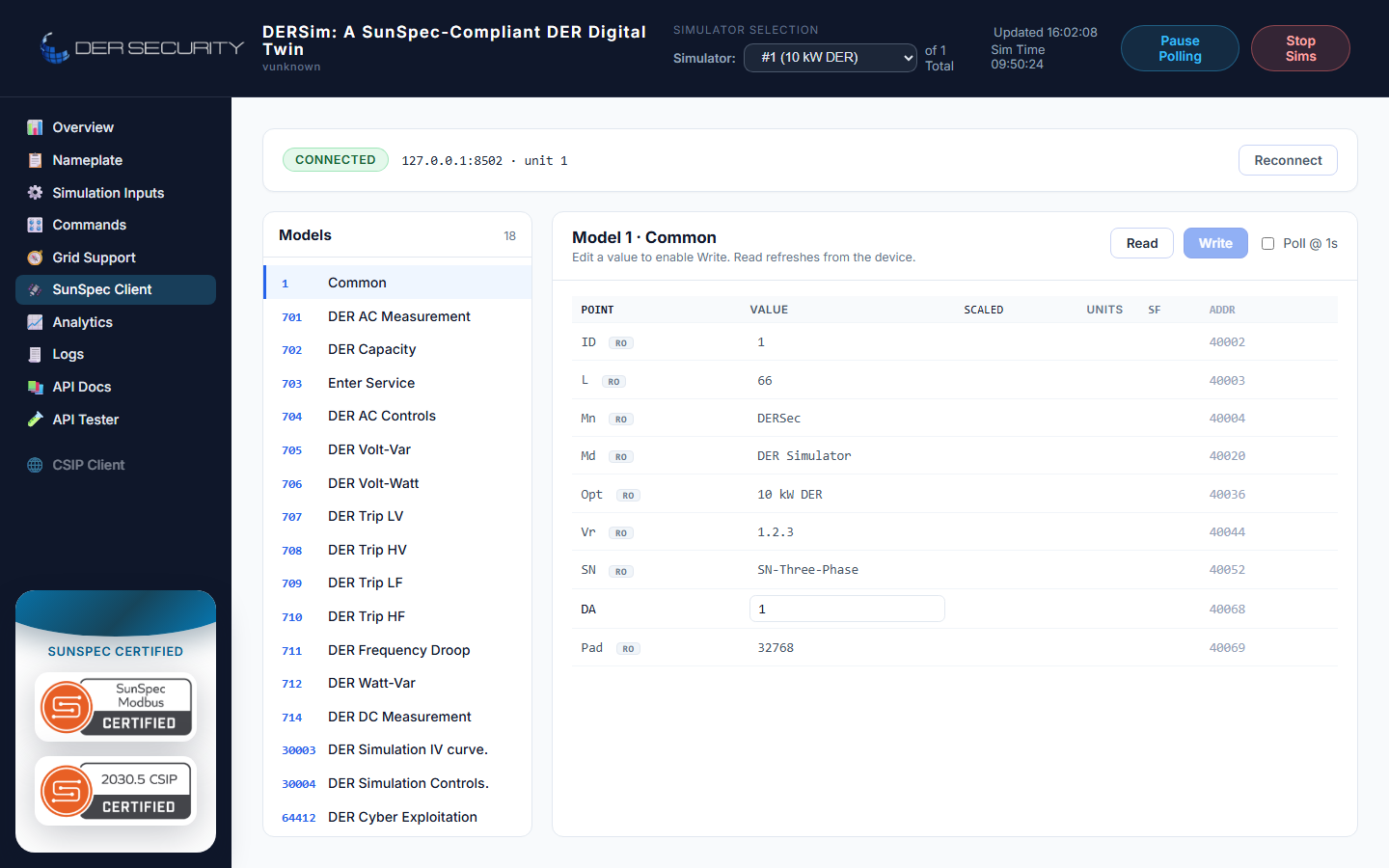
The Modbus traffic log appears in the dashboard's Logs view under the Modbus module tag — every register read / write is logged at Debug.
When to use Modbus vs the REST API
| Use case | Reach for |
|---|---|
| Driving from a SunSpec-compliant client | Modbus |
| Driving from a custom test harness | REST + WebSocket — typed JSON beats register-banging |
| Reproducing a vendor's exact wire shape | Modbus (with the proxy if you need a vendor map) |
| Subscribing to live state changes | WebSocket telemetry |
The Modbus server is the canonical SunSpec interface; the REST API is the canonical convenient interface. They read and write the same underlying state — there's no Modbus-only or REST-only register.