IEEE 2030.5 CSIP Client
The DER Simulator connects to an IEEE 2030.5 server (a utility head-end or an aggregator) as a Common Smart Inverter Protocol (CSIP) client. It discovers its DER endpoint, mirrors its capabilities, settings, and status back to the server, posts meter readings, and applies the DERControl schedules it receives — Volt-Var, Volt-Watt, fixed power factor, frequency droop, ramp rate, and enter-service.
Quick start
Start the simulator with a CSIP client connected to a server at
https://1.2.3.4:8443:
./sim --device_type PV-3Phase \
      --csip_client_enable yes \
      --csip_server_ip 1.2.3.4 \
      --csip_server_port 8443 \
      --csip_enc yes \
      --csip_cert /opt/dersim/certs/csip/client.pem \
      --csip_key  /opt/dersim/certs/csip/client.key \
      --csip_root_cert /opt/dersim/certs/csip/ca.pem
The full CLI surface for the CSIP client:
| Flag | Default | Description |
|---|---|---|
--csip_client_enable / -csip_enable |
yes |
Enable the CSIP client (yes or no) |
--csip_server_ip / -csip_serv |
127.0.0.1 |
IP / hostname of the IEEE 2030.5 server |
--csip_server_port / -csip_port |
8443 |
HTTPS port of the IEEE 2030.5 server |
--csip_enc / -ce |
yes |
Enable mutual TLS for IEEE 2030.5 |
--csip_cert / -cc |
cert.pem |
Client certificate PEM |
--csip_key / -ck |
key.pem |
Client private-key PEM |
--csip_root_cert / -cr |
root.pem |
CA certificate PEM used to verify the server |
--dcap |
/dcap |
DeviceCapability resource path on the server |
--use_test_pki_certs |
(off) | Use the bundled test PKI (pass the certs directory path); skips operator-supplied certs |
--csip-2018-compat |
off | Enable IEEE 2030.5-2018 XML compatibility for server PUTs (legacy servers that don't accept the newer XML shape) |
--csip_website_ip |
127.0.0.1 |
Bind address for the CSIP management web UI |
--csip_website_port |
5000 |
HTTP port for the CSIP management web UI |
What the CSIP client does at startup
Once enabled the simulator's CSIP client runs through this lifecycle:
- Discovery. Performs a
GETagainst the--dcappath on the server, walks the DeviceCapability tree, finds this DER's EndDevice record via the LFDI derived from the client certificate, and resolves the linked DERProgram, FunctionSetAssignments, MirrorUsagePoint list, and LogEventList hrefs. - DER state mirroring. Starts pushing
DERSettings,DERStatus, andDERAvailabilityPUTs at the server-advertised poll cadence (DERCapability defaults to 30 s as a safe backstop). Nameplate values and live status (operating mode, alarms, current readings) reach the server without operator action. - Metering. If the server exposes a MirrorUsagePoint list, the
simulator starts POSTing
MirrorMeterReadingblocks at 60 s intervals — power, voltage, current, energy registers per phase. - Control dispatch. Inbound
DERControlschedules and theDefaultDERControlare applied to the simulated inverter: Volt-Var, Volt-Watt, Watt-Var, fixed PF, fixed VAR, frequency droop, ramp rate, and enter-service are all honored.
If discovery fails (server unreachable, cert mismatch, etc.) the client retries every 10 s until it succeeds or the simulator is stopped. The dcap URL is included in the log line so misconfiguration is obvious.
Mutual TLS
CSIP traffic is over HTTPS with client-cert mutual TLS. The three certificate files are loaded once at startup:
--csip_cert— your client certificate (PEM). The LFDI (the IEEE 2030.5 device identifier) is derived from this cert's fingerprint, so it has to match what the server has provisioned for this DER.--csip_key— the matching private key (PEM).--csip_root_cert— the CA chain used to verify the server's certificate.
For lab work where you don't want to provision your own PKI, pass
--use_test_pki_certs PATH and the simulator loads a bundled test
certificate set from that directory instead. Filename conventions
follow the IEEE 2030.5 reference PKI: cert.pem, key.pem,
cert_root.pem.
When --csip_enc no is passed the client uses plain HTTP — useful
for protocol-level debugging against a non-TLS test server, never
appropriate for production.
Multi-device CSIP
When -N COUNT is passed the simulator spins up COUNT independent
DERs in one process. The CSIP layer assigns each one its own client
certificate from the bundled test-PKI rotation (cert_1.pem,
cert_2.pem, …) so the server sees N distinct LFDIs from the same
host — useful for load-testing a head-end or running a small
virtual feeder.
IEEE 2030.5-2018 vs newer XML
Some legacy servers reject the post-2018 XML shape that the
simulator emits by default — they expect the original 2030.5-2018
schema for DERSettings and DERStatus PUTs. Pass
--csip-2018-compat to switch the PUT body to the 2018 shape. The
difference is wire-level backwards compatibility only, not a
functional change.
DER state PUT cadence
The simulator watches the server's advertised poll rates (via
DeviceCapability.pollRate etc.) and honors them. As a backstop,
DERCapability defaults to a 30 s poll cadence so a misconfigured
server doesn't leave the DER silent for hours. PUTs are skipped
when the underlying values haven't changed since the last successful
round-trip.
Metering and MirrorUsagePoint
When the server exposes a MirrorUsagePoint list, the simulator POSTs
MirrorMeterReading blocks every 60 s. Each post carries the
phase-resolved per-line readings the inverter actually produces:
- Active power (W) per phase + total
- Reactive power (VAR) per phase + total
- Apparent power (VA)
- Voltage (V) per phase
- Current (A) per phase
- Energy registers (Wh import + export, where applicable)
LogEventList integration
A LogEventList is registered during discovery if the server advertises one. The simulator can trigger a burst of BASIC-027 LogEvent POSTs in two ways:
- Modbus-driven. SunSpec model 64415
LogEventEnaregister — when a Modbus client writes a non-zero value, the simulator spawns the same LogEvent burst on the CSIP side. Useful for end-to-end tests that exercise the Modbus-to-2030.5 path. - Operator-driven. REST endpoint on the simulator's management
API; pass
alarm_statusandintervalto space the events.
Both paths produce the same wire shape a production DER would emit.
CSIP management web UI
The simulator hosts a CSIP management web UI at
http://<csip_website_ip>:<csip_website_port> (default
http://127.0.0.1:5000). It exposes:
- The discovered EndDevice tree
- Current DERSettings, DERCapability, and DERStatus values
- Active DERControls and the DefaultDERControl
- A REST API for programmatic test harnesses
The dashboard's main page also has a CSIP Client sidebar entry that mirrors the same client status (connection state, discovered EndDevice, active DERControls) without the standalone management UI.
Programmatic testing
For test harnesses that need to drive the CSIP client from a script — confirm that a server-side DERControl change reached the inverter, trigger a LogEvent burst, force a re-discovery after swapping certs — the simulator's REST API exposes everything the dashboard does:
# Snapshot the CSIP client status
curl http://localhost:8111/api/dersim/csip-client | jq .

# Tail the CSIP module log
curl 'http://localhost:8111/api/dersim/logs?modules=CSIP&limit=200'

# Programmatic LogEvent burst (alternative to writing SunSpec 64415)
curl -X POST http://localhost:8111/api/dersim/csip/log-event-burst \
     -H 'Content-Type: application/json' \
     -d '{"alarm_status": "Abnormal", "interval": 5, "count": 10}'
See the REST API overview for the full management surface and the WebSocket telemetry stream for live inverter state during a CSIP exchange.
Dashboard "Logs" view — CSIP module
CSIP traffic — discovery calls, every PUT, every MirrorUsagePoint POST, every inbound DERControl — is mirrored into the simulator's log buffer under the CSIP module tag. Filter the dashboard's Logs view by the CSIP module to see the live conversation between the simulator and your 2030.5 server.
Operating from the LabTest GUI
The full set of CSIP knobs is also reachable from the LabTest GUI's "DER Simulator" page (see the LabTest Pro User Manual). The GUI maps each form field to the matching CLI flag.
GUI walkthrough
-
Select IEEE 2030.5 Server from the Simulators menu.
-
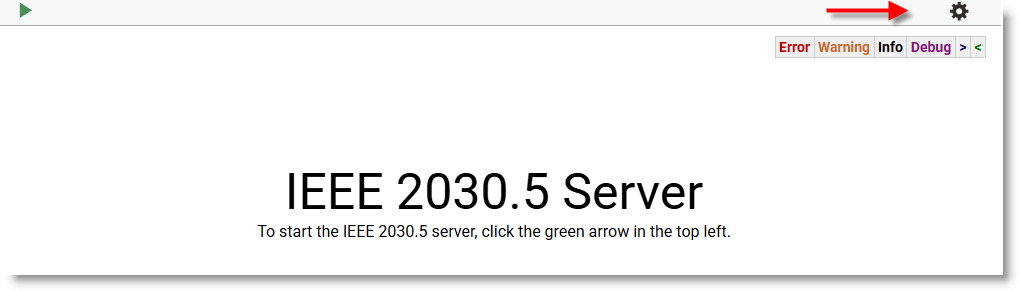
Click the settings gear to configure the CSIP Server settings.
-
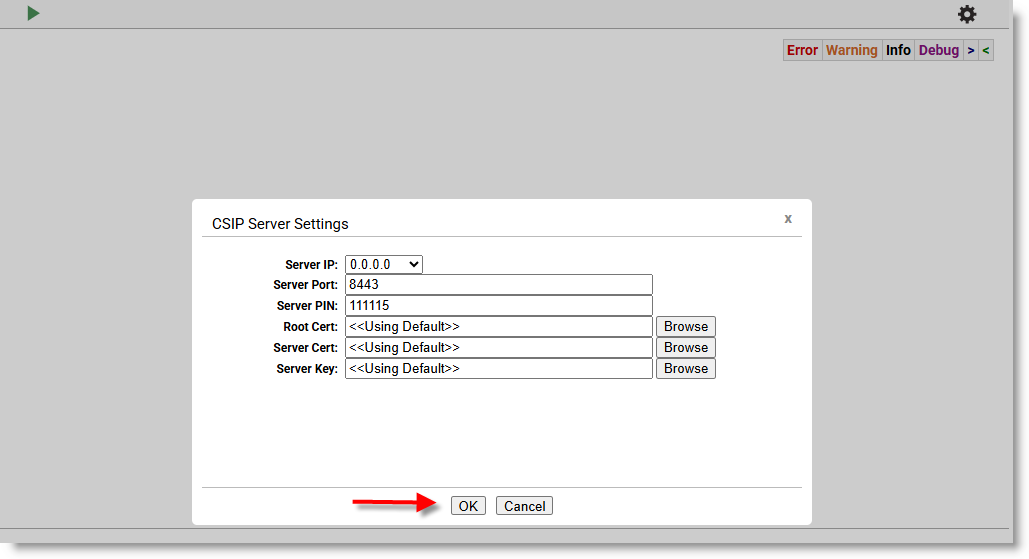
Click OK to accept the default settings, or enter your own and click OK.
-
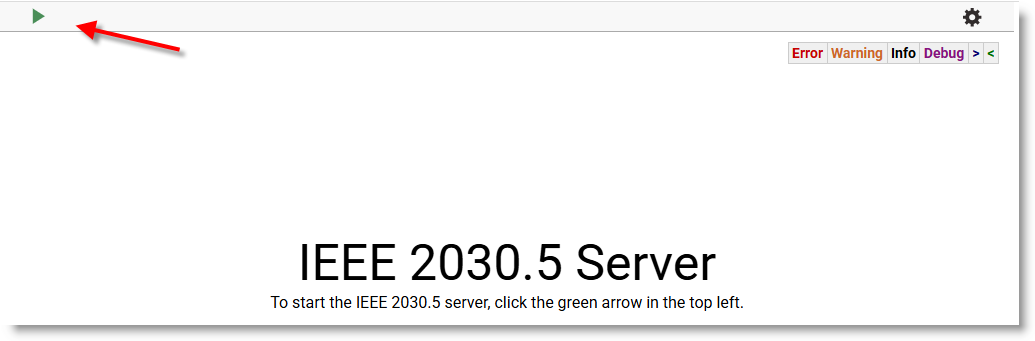
Click the green button to start the server.
-
Select DER Simulator from the Simulators menu.
-
Click the settings gear.
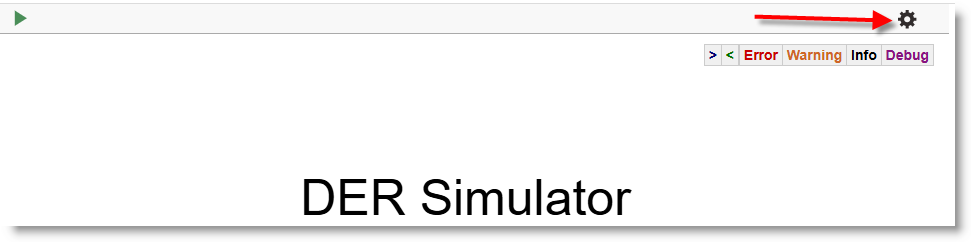
-
To activate Encrypt IEEE 2030.5 on the DER Simulator, click Yes. You will see
<< Using Default >>certs; click OK.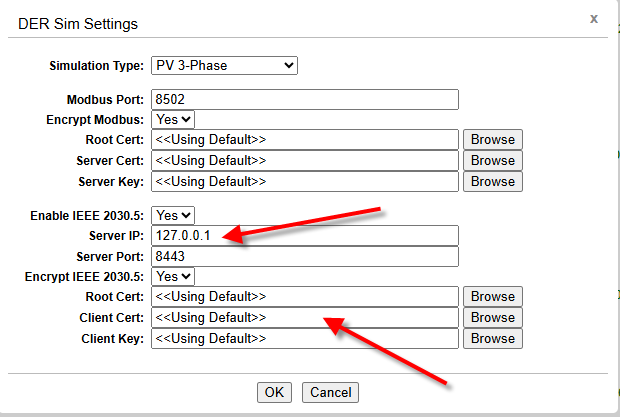
-
Click the green button to start the DER Simulator.
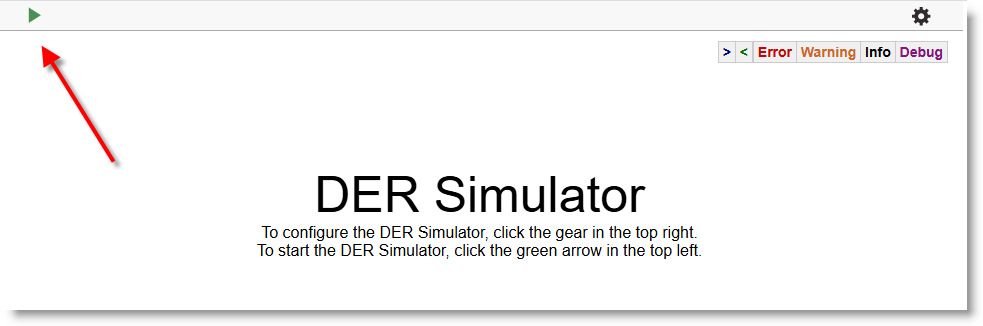
-
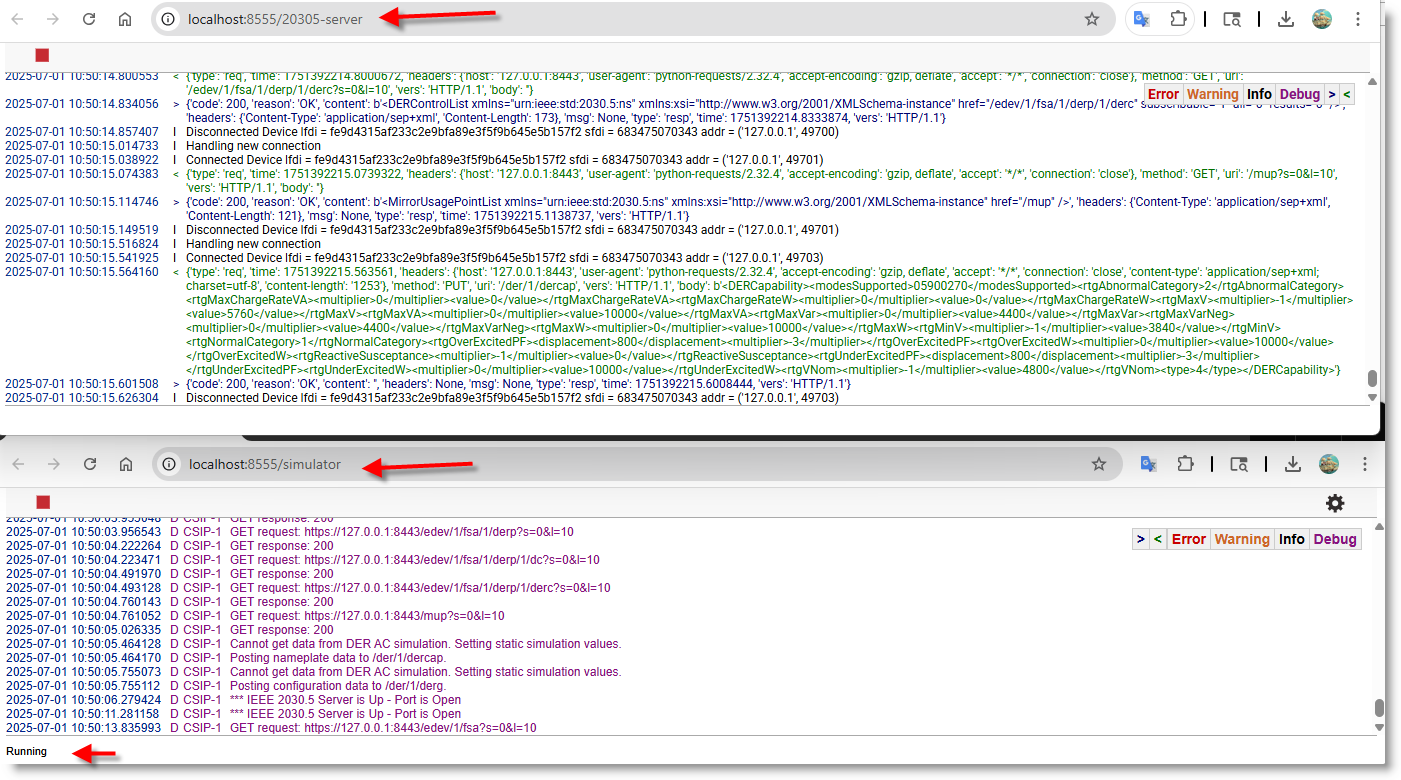
The dashboard should now look like this on each tab: